Digital menu

A QR code menu you can update in seconds

Guests scan the code on their table and your menu opens in their phone’s browser, with no app and no sign-up. Photos, allergens, translated descriptions and prices that are always up to date. Qrolla’s digital menu is free during the launch period.

What is a QR code menu?

A QR code menu is a contactless digital menu that guests open on their own phone. Each table has a small card with its own QR code. Guests point their camera at it and your menu opens as a web page, so there is nothing to download and no account to create.

For restaurants, cafés, bars and terraces the biggest win is that the menu never goes out of date. A new seasonal dish, a price rise or a soup that has run out is fixed in the admin panel and shows up on every guest’s phone straight away. No reprints, no stickers over old prices, and no waiting for someone to bring a menu to the table.
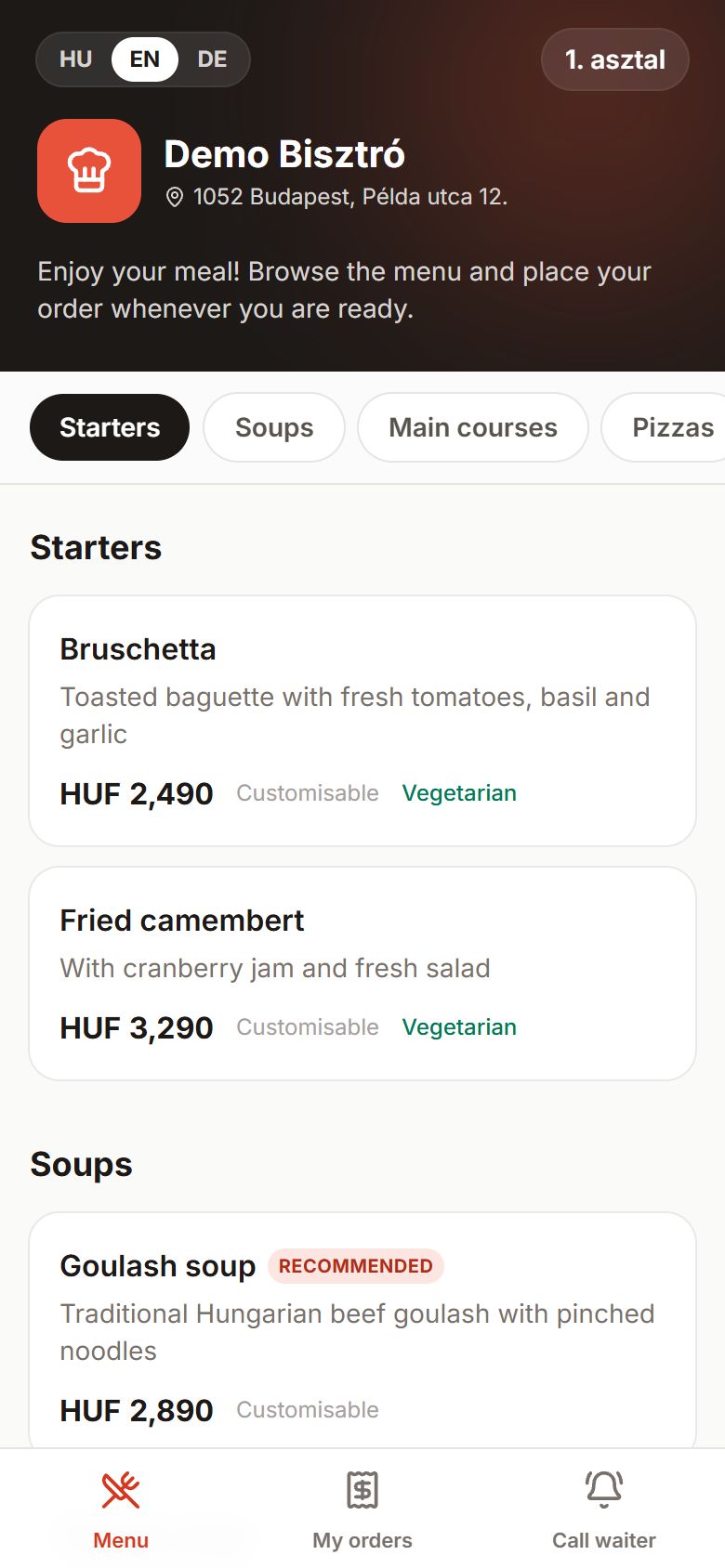
QR code menu on a guest’s phone with categories, photos and prices

How guests use your contactless menu

For the guest it takes a few seconds and needs no technical know-how.

Because every table has its own code, you always know which table an order came from. Guests can reopen the menu later from their browser history to browse, but ordering only works at the table after a fresh scan.

  • They sit down and scan the QR code on the table with their phone camera.
  • The menu opens in the browser, automatically in the phone’s language: Hungarian, English or German.
  • They browse by category and check photos, descriptions, allergens and prices.
  • If you also use QR code ordering, they add dishes to the cart and place the order from the same page.

Allergens, dietary tags and options built in

A good digital menu is more than a scanned PDF on a small screen. Every dish gets its own photo, description and price, grouped into categories the way guests actually look for food.

The result: guests order exactly what they want, and the kitchen gets clear tickets instead of guesswork.

  • All 14 EU allergens marked per dish, so guests don’t have to ask about every item.
  • Tags for vegetarian, vegan, spicy, gluten-free, lactose-free, recommended and new.
  • Option groups with surcharges for sides, sizes and extras: required or optional, single or multiple choice.
  • Removable ingredients (“no onion”) and a note for the kitchen.
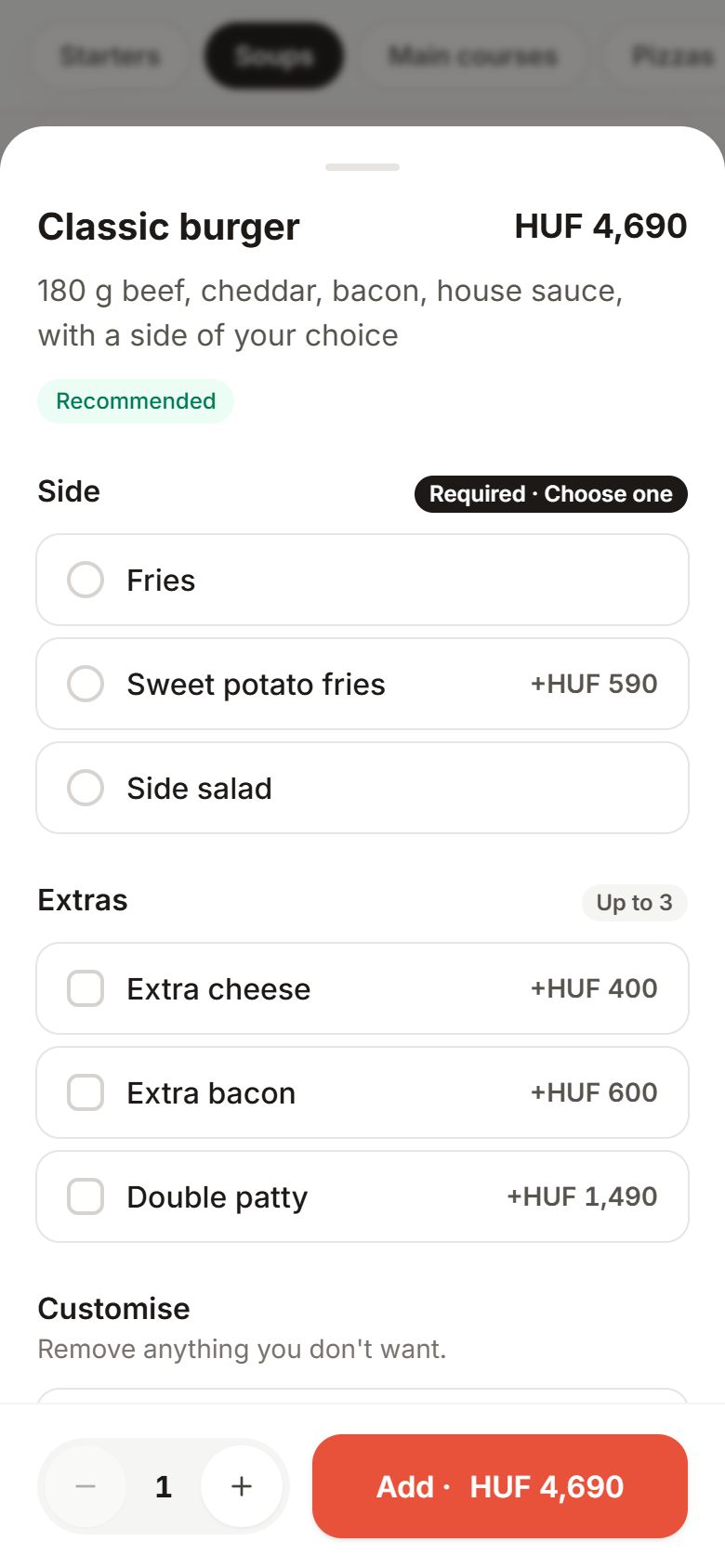
Dish details on a digital menu with allergens and a choice of side

A multilingual menu for international guests

The guest pages are available in Hungarian, English and German. The language is picked from the phone’s settings, and guests can switch with one tap, so buttons, labels and notifications all appear in their language.

You enter the dish names and descriptions for each language yourself. There is no automatic translation, which means no embarrassing machine-translated dish names. When a tourist orders in English, your kitchen still receives the order in your own language, and staff see a language badge so they know an international guest is at the table.

Update your digital menu in real time

The trouble with a printed menu is that it is out of date the day it comes back from the printer. With a QR menu, every change reaches guests’ phones instantly.

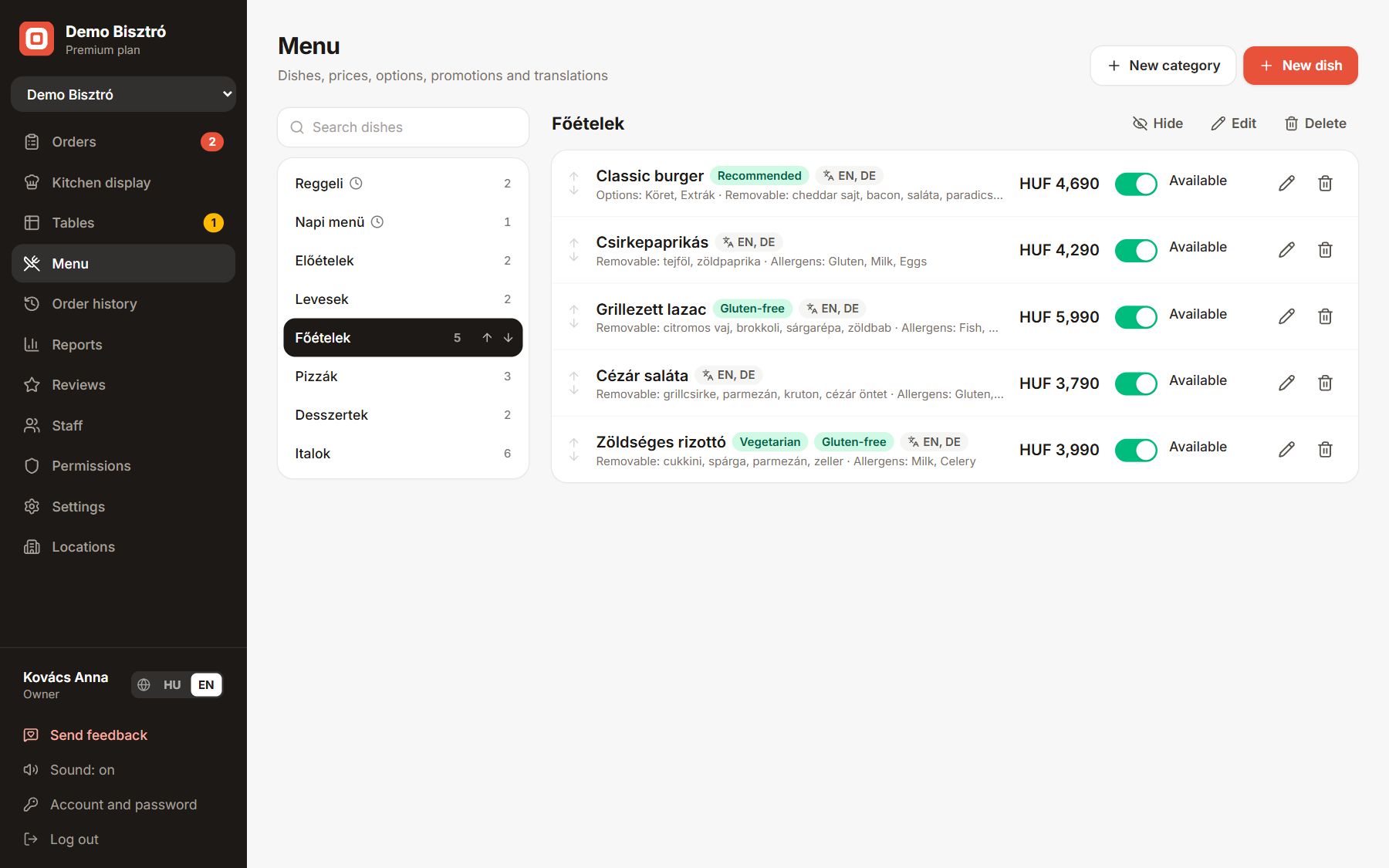
  • A one-tap “sold out” switch, which you can also let your waiters use.
  • Stock counts: say you have 20 portions of goulash today. Guests see “only N left” once 5 or fewer remain, and the dish turns sold out automatically at zero.
  • Daily stock resets at 4 am, so every morning starts with a clean slate.
  • Change prices, descriptions or photos without reprinting anything.
qrolla.com/admin
Menu editor in the admin panel with categories, dishes and a sold-out switch

Printable QR codes, protected against prank orders

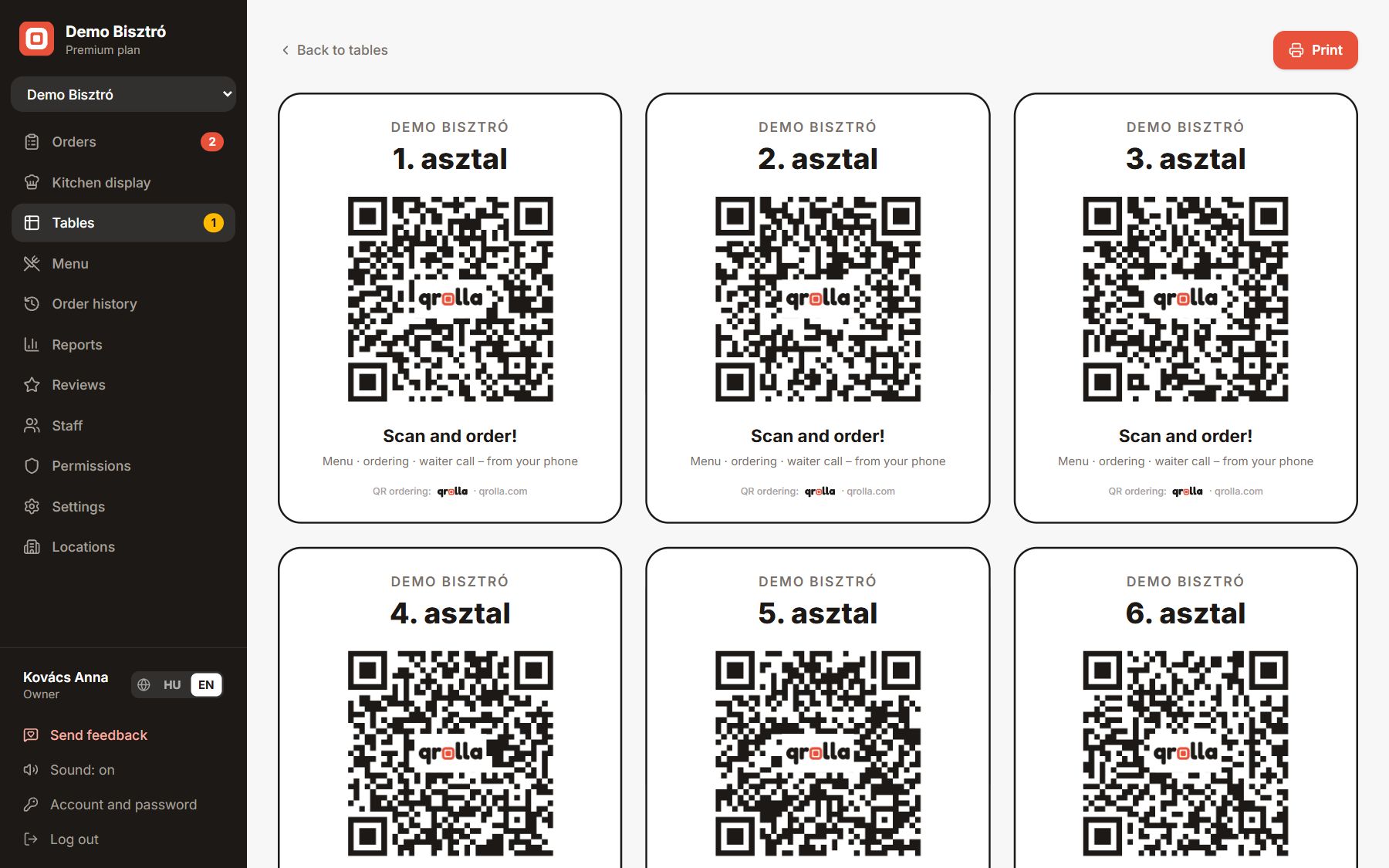
Qrolla generates the QR codes for you. Download an A6 PDF for each table, or A4 sheets with four cards per page. The Qrolla logo sits in the middle of each code, and the cards fit a table stand or can be laminated and stuck down.

Each scan opens a two-hour ordering window. If someone opens the page later from their browser history at home, they can browse but not order, so prank orders never reach your kitchen. If a code ends up in the wrong hands, regenerate it in one click and the old one stops working immediately.
qrolla.com/admin
Per-table QR codes and printable PDF cards in the admin panel

Set up in about 15 minutes, free during launch

With a small menu you can be up and running in about 15 minutes: add your categories and dishes, create your tables and print the QR codes. No new hardware is needed, as any phone, tablet or laptop with a browser will do. Your data is stored on an EU server, served over HTTPS and backed up daily.

Qrolla is free during the launch (beta) period, with every feature included. Planned plans start at HUF 9,900 a month, with no commission per order, no lock-in and no card needed to sign up. Try the live demo on your own phone, or sign up and welcome your guests with a QR code menu today.

Frequently asked questions

Do guests need to download an app to use the QR code menu?

No. After scanning the QR code, the menu opens in the phone’s browser with no app and no sign-up. Most smartphone cameras recognise QR codes out of the box.

How much does a digital menu cost?

Qrolla is completely free during the launch period. Planned monthly prices are Starter at HUF 9,900 (15 tables), Pro at HUF 19,900 (50 tables) and Premium at HUF 39,900 (unlimited tables, branding and multiple locations). There is no commission and no lock-in.

Does Qrolla translate my menu automatically?

No. The guest pages work in Hungarian, English and German, and you enter the dish names and descriptions in each language yourself. That way guests always see exactly what you serve.

How are allergens shown on the menu?

For each dish you tick which of the 14 EU allergens it contains, and guests see them on the dish page. Tags also let you mark dishes as vegetarian, vegan, gluten-free or lactose-free.

Can someone order from home after visiting the restaurant?

They can browse, but not order. Ordering is only possible for two hours after scanning the QR code, so reopening the page from browser history cannot be used for prank orders. You can also regenerate any code in one click.

Do I need new devices or a printer?

No. Any phone, tablet or laptop with a browser works for your team, and guests use their own phones. You can print the QR cards on an ordinary office printer; an 80 mm thermal printer for kitchen tickets is optional.

Get started today – it takes 15 minutes.

During the launch period every feature is free. No credit card, no lock-in, nothing to install.